With MIM SP3 now available, I have started working on upgrading some existing MIM environments.
Before upgrading to SP3, an existing MIM installation needs to be at version 4.6.673.0 or later. This means that some customers, especially those that have not been regularly patching their MIM environment, have some work to do before starting the actual SP3 upgrade.
At one customer I recently upgraded their MIM 2016 SP2 installation to 4.6.673.0 (KB5018333).
The Synchronization Service and MIM Service updates installed without any problems. However, this customer also uses a MIM Service and Portal Language Pack, and updating the Language Pack turned out to be a little more interesting.
The Language Pack update fails
When installing:
MIMServiceLP_x64_KB5018333.msp
the installation failed and rolled back.
Looking at the verbose MSI log showed that the failure occurred during:
FIMServiceResourceLocalizer
Importing localized resource strings in MIM DB
The installer was running:
Microsoft.ResourceManagement.Setup.LanguagePack.ResourceLocalizer.exe
and eventually returned error 1603.
The Windows Application Event Log gave us the more useful information:
Application: Microsoft.ResourceManagement.Setup.LanguagePack.ResourceLocalizer.exe
Framework Version: v4.0.30319
Description: The process was terminated due to an unhandled exception.
Exception Info: System.Net.Sockets.SocketException
Exception Info: System.Net.WebException
Exception Info: System.ServiceModel.EndpointNotFoundException
Further down in the stack trace:
Microsoft.ResourceManagement.WebServices.MetadataClient.Get()
Microsoft.ResourceManagement.WebServices.Client.ResourceManagementClient+SchemaManagerImplementation.RefreshSchema()
Microsoft.ResourceManagement.WebServices.ResourceManager.get_SchemaManager()
Microsoft.ResourceManagement.Setup.LanguagePack.Program.CheckLanguageCodeExists()
Initially this looked like a connectivity problem between ResourceLocalizer and the MIM Service.
But the MIM Service was running normally, the MIM Portal worked, and the normal MIM Service endpoints were accessible.
So what was going on?
Files in Use
Running the Language Pack update again revealed the important detail.
During the installation, Windows Installer detects that Forefront Identity Manager Service is using files that need to be updated.
The installer presents the usual Files in Use dialog with two choices:
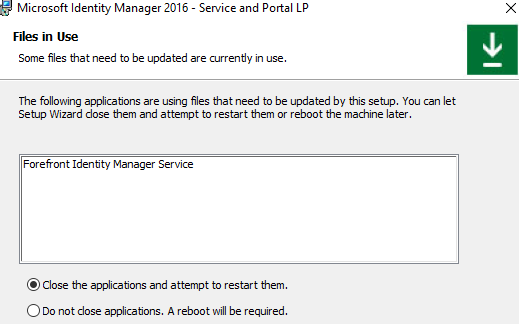
- Close the applications and attempt to restart them.
- Do not close applications. A reboot will be required.
The first option is selected by default.
And that is where things get interesting.
If you let Windows Installer close the application, the Forefront Identity Manager Service (FIMService) is stopped.
Normally that would seem like a perfectly reasonable thing to do when patching files used by a service.
Unfortunately, the Language Pack installer subsequently launches Microsoft.ResourceManagement.Setup.LanguagePack.ResourceLocalizer.exe.
ResourceLocalizer then tries to connect to the MIM Service to retrieve the schema and update the localized resources in the MIM database.
But we just allowed Windows Installer to stop that service.
The result is:
- SocketException
- WebException
- EndpointNotFoundException
- ResourceLocalizer fails
- MSI error 1603
- Rollback
Not exactly the error message that makes you immediately think “I selected the wrong option in the Files in Use dialog.”
The solution
The solution turned out to be very simple.
When the MIM Service and Portal Language Pack installer displays Files in Use, select:
Do not close applications. A reboot will be required.
This keeps FIMService running while the Language Pack installer executes ResourceLocalizer.
During my second installation attempt I monitored FIMService and confirmed that it remained running while the installer was at:
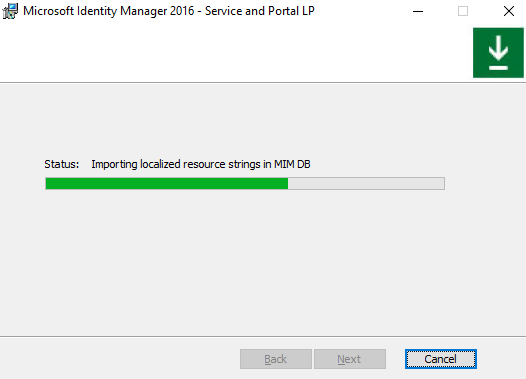
Importing localized resource strings in MIM DB
This time ResourceLocalizer completed successfully and the Language Pack update finished without errors.
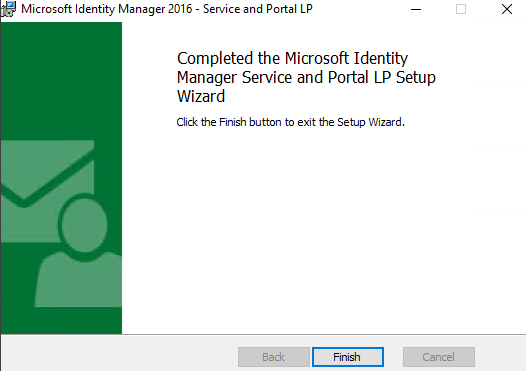
As expected, Windows Installer then informed me that a restart was required for the changes to Microsoft Identity Manager Service and Portal Language Pack to take effect.
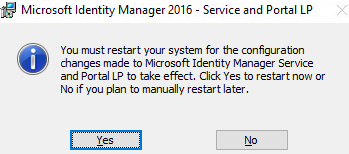
After completing the update, reboot the server so that the files that could not be replaced while FIMService was running can be updated.
A small installer trap
I think this is a rather unfortunate installer behavior.
The default choice in the Files in Use dialog allows Windows Installer to stop a service that a later custom action in the same installer requires to be running.
At the very least this behavior should be documented in the update instructions for the Language Pack.
So, if you are preparing an older MIM environment for SP3 and need to install the 4.6.673.0 Language Pack update, remember:
Keep FIMService running during the Language Pack update.
When prompted about files in use, choose “Do not close applications. A reboot will be required.”
It might save you a few hours of troubleshooting an EndpointNotFoundException that really isn’t a network problem at all.
More notes from my MIM SP3 upgrade journey will follow.